Search Claude Code and Codex conversation history by text
Start with the words you remember. Press / to filter titles, opening prompts, projects, and IDs; use ⌘K or Ctrl+K to find a phrase inside any message, then confirm the provider and project before reopening the native session.
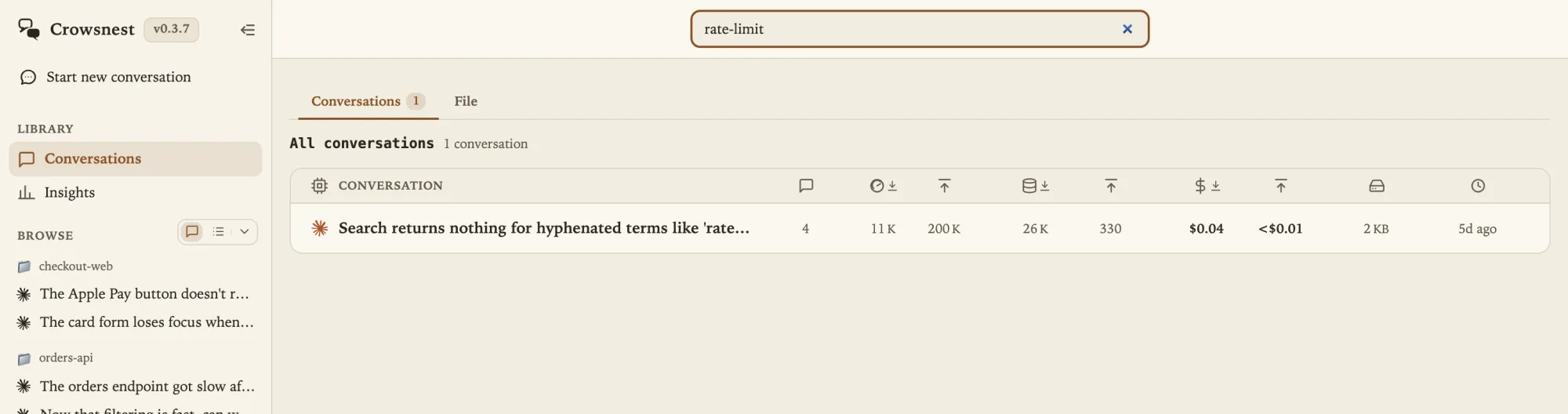
Search for what you remember, not for how the runtime stored it.
Conversation stores are optimized for continuity, not human recall. Claude Code saves sessions under project-derived directories; Codex exposes threads through app-server. Neither native identifier helps when your memory is “the answer that explained our stale cache header.”
A useful conversation search therefore starts from four kinds of memory: where the task ran, what you first asked, a phrase written later, or roughly when it happened. It should not require you to know a JSONL filename, thread id, or provider before you begin.
Card-level memory
Project, title, first prompt, provider, date, or session id. This evidence is already available without opening every transcript.
Turn-level memory
A sentence from an answer, command, error, or follow-up. Finding it requires searching the messages inside conversations.
Fast filtering and full-message retrieval solve different jobs.
Crowsnest keeps the two jobs separate so an everyday filter does not become an expensive scan of every transcript on every keystroke.
- Gallery search is immediate narrowing. The ordinary search field matches title, opening prompt, project label, and id. Press / to focus it and keep typing to reduce the visible gallery.
- Command-K searches message bodies. Press ⌘K on macOS or Ctrl+K elsewhere when the remembered words may be anywhere in a user message, assistant answer, or tool evidence.
- Multi-word results are relevance-ranked. Matching passages carry enough context to judge the result before opening it, rather than returning a flat list of opaque ids.
- Folder and provider remain useful facets. Search within a selected subtree when the repository is known, and use the Claude Code or Codex filter when the runtime matters.
The escalation is deliberate: begin with the cheapest evidence, then search inside the records only when the card cannot answer.
Use exact text first; meaning search is optional.
Gallery filtering and full-message search run locally and work best when you remember the actual words. Start there: an error fragment, command, filename, or unusual phrase is strong evidence and needs no external service.
If the wording changed, Crowsnest can offer an optional TypeSafe Jev meaning search. Connecting a key enables nothing by itself. When you choose meaning search, Crowsnest first asks for confirmation and names the payload: one query and at most 24 bounded, pattern-redacted result snippets go to TypeSafe’s fixed HTTPS endpoint for ranking. Full transcripts, project files, settings, and credential stores are excluded.
Use meaning search to rank a difficult candidate set, not as the default path. The returned match still carries its provider, project, timestamp, role, and quoted evidence so you can verify it before opening anything.
A five-step retrieval workflow beats browsing by date.
Choose the broadest folder you trust
Select the repository or parent directory if you remember it. Folder selection includes every conversation beneath that subtree; clear it when the work may have happened elsewhere.
Try the phrase in gallery search
A project name or opening-task fragment often finds the card immediately, without reading message bodies.
Escalate unchanged to full-message search
If the gallery stays empty, keep the same words and open Command-K. Changing both the query and the search layer at once makes it harder to learn what matched.
Read the evidence around the match
Check the provider mark, project, timestamp, message role, and highlighted passage. Similar answers often exist in several retries or branches.
Open first; continue second
Read enough surrounding context to confirm the thread. Then use that provider's supported continuation action instead of copying fragments into an unrelated session. For Claude, choose the resume path that identifies the exact stored conversation. For Codex, use the resume command that matches what you know.
The result is shared; continuation remains provider-native.
Crowsnest normalizes Claude Code and Codex into one gallery and one search surface, but it does not pretend their stores are interchangeable. Claude Code history is read from its local JSONL sessions. Codex conversations are discovered and read through codex app-server, the same integration surface OpenAI documents for rich clients.
A provider-specific error stays provider-specific. Missing or broken Codex should not erase readable Claude history, and a Claude parsing problem should not blank Codex results. Every match retains its provider mark so reopening it uses the native runtime and the capabilities that runtime actually supports.
Stable conversation URLs preserve the chosen conversation, provider source, and account context across a refresh. They are local navigation state—not public share links and not an uploaded transcript.
Exact-text search runs locally; the optional exception stays bounded.
Searching sensitive history should not quietly turn it into a hosted index. Gallery filtering and full-message search stay on the machine that owns the records. The server's reusable cache holds metadata keyed by file modification evidence; it does not retain transcript bodies as a second message store. The browser keeps only a bounded result cache, aborts an active request when the query changes, and rejects stale responses.
The server binds to 127.0.0.1. Ordinary exact-text search makes no external request. The separately confirmed TypeSafe meaning-search option is the narrow exception described above; it sends bounded, redacted snippets rather than a full transcript. Claude Code and Codex still contact their own providers only when you deliberately continue or start live work.
Conversation gallery, folder browsing, and full-message search are included in the seven-day trial, Standard, and Pro workspaces.
Provider documentation and released implementation
Provider references: Anthropic's Claude Code session guide and OpenAI's Codex app-server guide. Search modes, shortcuts, caches, result attribution, stable URLs, TypeSafe boundaries, and plan availability were rechecked against the released Crowsnest 0.3.15 source on October 29, 2026.
Published September 9 and source-reviewed October 29, 2026. Provider storage and protocol behavior can change; the linked first-party documentation is authoritative for current provider mechanics.